Discover The World Around You Discover The World Around You
Rebel Shop Geek Store

Subscribe

How To: Stay Awake When Work Deadlines Are Looming [Infographic]

Bit Rebels Twitter Profile Promotion
MOST RECENT RETWEETERS
Retweet Match Help Button
 
Default Retweeter Profile Image
Tweet Article To Promote Yourself Here
Default Retweeter Profile Image
Tweet Article To Promote Yourself Here
Default Retweeter Profile Image
Tweet Article To Promote Yourself Here


Previous Article
Check Out More Of Our Geekery
Next Article
share
Pin It

Sidewise Extension Brings A Dockable Vertical Sidebar To Chrome

google-chrome-sidewise-extension

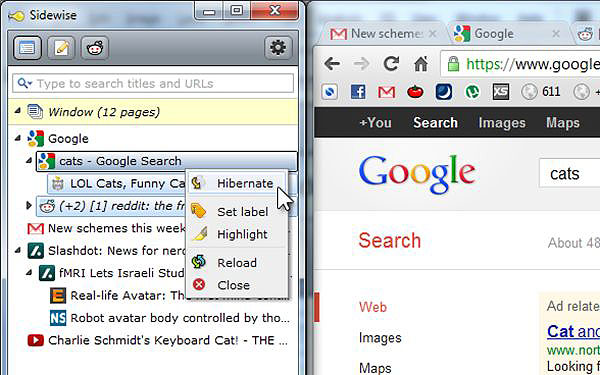
If you already use Google Chrome as your web browser, you probably don’t even think you need another perk to enhance your user experience. Having said that, if Chrome is your browser of choice, an awesome  new app or plug-in wouldn’t necessarily come as any surprise. So, a BETA version of Sidewise (a new extension for Google Chrome) bringing a dockable vertical sidebar to your browsing experience is just a bonus. The new Sidewise extension has some pretty cool features and functions including Tree Style Tabs, Tab Hibernation, Search, Set Label, Highlight, Copy URL, Folders and plenty more.

After a quick play (and after getting used to the sidebar being there) it’s pretty clear that it’s geared towards an easier and more fluid user experience. If you are anything like me, you end up having at least a dozen tabs open during any serious web session (I just counted, and I have 15 open while I’m writing this). Because each tab obviously uses up system resources, Sidewise brings Tab hibernation to the rescue to free up resources for what is important at the time.

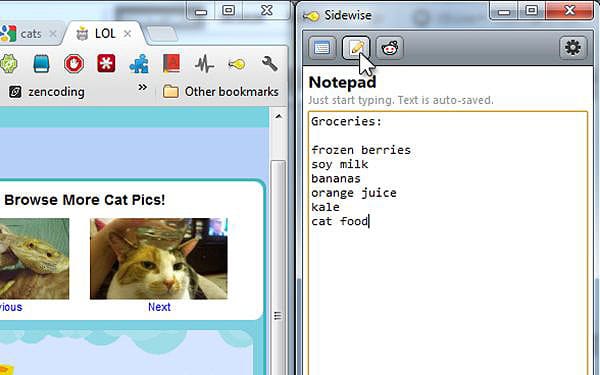
Other useful sidebar panes such as Notepad and Reddit are great tools for blogging or researching, and even just helping to flag that important content you found or stumbled upon. Additional sidebar panes are no doubt on the horizon. As a Chrome user (or potential convert), it’s important that you appreciate that Sidewise is still a BETA extension. That means developer donations are essential to ensure that Sidewise can continue to enhance your Chrome browsing experience.

After giving it a try, I now expect functions like ‘Multi-select with ctrl+/shift click’ & ‘Intelligent drag and drop’ as standard. Give it a go. I’m keen to hear which cool new features you find useful, so please leave a comment below with your thoughts. You can try it here at Google Chrome Sidewise Extension.

Google Chrome Sidewise Extension
sidewise-google-chrome-extension

sidewise-google-chrome-extension

sidewise-google-chrome-extension

Image Credits: [Google Chrome Sidewise Tabs] [ProProfs Flash Cards] [HD Computer Wallpaper]


You Might Also Like...
Bit Rebels
Teenagers And Facebook: The Appeal Is Wearing Off [Infographic]
SHARES
292
Pocket Printer For Photographers Now A Reality From LG
SHARES
3,127
Hobbit Hole LEGO Build Goes Far Beyond The Realm Of The Block
SHARES
243
Power Charger Fuels Your Smartphone Using Just A Hot Or Cold Source
SHARES
500
Wear Your Own Portable Operating System In A USB Wristband
SHARES
181
 
 
Author Avatar Image Representation

Author: Matt Crawford


Matt is an accomplished Sales & Marketing executive specializing Social Media Marketing and Brand Strategy. He currently lives in Roma, Queensland in the Australian outback and is a super keen snowboarder and surfer when he gets the chance. Passionate about helping businesses get started in Social Media marketing, Matt runs a boutique marketing business named Social Strategies. He also produces House Music with his studio partner as ‘Warbled Sight Duo’ (ask him what that’s an anagram for) and enjoyed the lifestyle of a globe hopping DJ in an earlier chapter. Matt loves conversation, so you should connect with him through your preferred Social Media channel.

Leave A Comment