
You Are The CSS To My HTML Procrastinators Unite T-Shirt Concept
Rebel Shop Geek Store

Subscribe

Space Saving Work Desk For Two That Transforms Into Large Dining Table

Richard Darell Twitter Promotion Ad
MOST RECENT RETWEETERS
Retweet Match Help Button
 
Default Retweeter Profile Image
Tweet Article To Promote Yourself Here
Default Retweeter Profile Image
Tweet Article To Promote Yourself Here
Default Retweeter Profile Image
Tweet Article To Promote Yourself Here


Previous Article
Check Out More Of Our Geekery
Next Article
share
Pin It

For Moody Tweeps: The Emoticon Keyboard

Type Smiles with Emoticon Keyboard

It seems emoticons are taking over the world, doesn’t it? I put one in almost every one of my tweets, and I just love them. It’s crazy to me how much emotion a person can convey in a few symbols put together. It’s like another language. I’m also noticing in so many social apps that I download it asks, “Would you like to set your mood?” and it gives a selection of emoticons to choose from. Emoticons are what we use to show the online world how we feel, and it seems we are using them more and more.

Soon you will be able to change your mood online as quickly as you change it in real life. This is the emoticon keyboard, and I wish I could get one today. Right now this little beauty is only a prototype, but I still can’t wait to get one. It plugs into your computer via USB port, and it easily allows you to display sixteen different emotions with just a click! If you would like to know how to type more emoticons, you can visit the master list of smileys and emoticons.

This is conceived by a company called Lavateli. If anyone from the company reads this, may I make a small suggestion of something to add before this gets mass-produced? Please add an additional row of 4 keys that allows us to express: LOL, ROFL, LMBO (or LMAO) and WTH (or WTF). Then, I will officially say this keyboard is perfect. :)
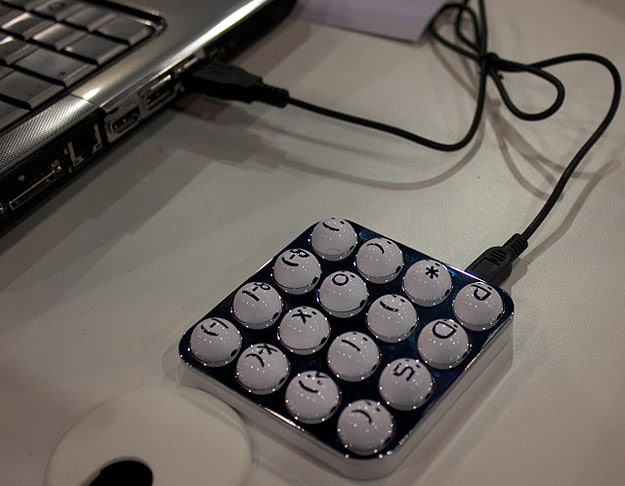
Emoticon Keypad Expresses Emotions

Via: [Geek]


You Might Also Like...
Bit Rebels
Bladepad: Turn Your iPhone Into The Ultimate Gaming Tool
SHARES
108
No More Star Wars vs Star Trek: J.J. Abrams Rules Them All!
SHARES
178
Moments In Tech History Every Geek Should Know [Infographic]
SHARES
275
Spectacular Space Shuttle Flight Decks [10 Photos]
SHARES
179
8,000 Transparent LEGO Pieces Create Geeky Yet Elegant Chandelier
SHARES
331
 
 
Author Avatar Image Representation

Author: Diana Adams


As the editor and global advertising director for Bit Rebels, Diana spends her days fine-tuning the content for Bit Rebels and working with established companies, startups, app developers and Internet entrepreneurs who want to be associated with the Bit Rebels brand. Diana started with Bit Rebels in July of 2009, three weeks after the site launched. She brought fifteen years of Information Technology experience and a love of everything considered geek with her, and she enjoys the journey each day as the site continues to reach more people and progress at a very fast pace. You can usually find Diana working in the Bit Rebels office located in Atlanta or sitting in the corner of a downtown Starbucks somewhere with her MacBook, iPad, iPhone and a Grande Caramel Macchiato. You can reach Diana at diana@bitrebels.com

Leave A Comment