
Subscribe


A Browser-Based Dashboard for Twitter

01/04/2010 - 9:00 am By Misty Belardo
8

When we all started with Twitter the only client we used was the Twitter interface on the web, but now there are so many that one can use to make their Tweeting a lot more enjoyable.

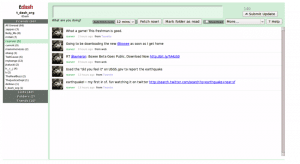
You got TweetDeck, Seesmic, Twurl and a lot more.  Now there is TDash. The developers of TDash designed it to look similar to that of the  Google Reader interface.

The key features of such an interface are:

  • the ability to mark tweets as read, and thus to narrow down the user’s attention to tweets that are as yet unread.
  • sort incoming tweets into nice folders automatically
  • Inline expansion of conversations!
  • Support for Twitter lists
  • Automatic URL shortening via Bit.ly
  • Ability to upload images.

Plus it has Keyboard shortcuts to make it fun and easy to use and is safe because it allows you to sign in using the OAuth.  No need to give out your password.  It is great too that you will not be required to install any software it is web based.

So if you are looking for a new tool to use, try it out and let us know what you think.
Main Image Source
TDash

More Articles By Misty Belardo | Articles: 669

Author: Misty Belardo

Misty is a Digital Activations Director for one of the most awarded interactive ad agencies in the Philippines. Her true love is design and self-expression. She believes in encouraging others to bring out their creativity to the surface and in whatever medium they feel comfortable with. A designer at heart that loves hand drawn design. She enjoys sketching, painting and doodling. Creating avatars and hand drawn icons and logos are her favorite. Gifted with a very active imagination and uses that to blog about her interactive experiences. Coffee and music lover. Loves social media, Twitter and FaceBook. Connect with her on Twitter @mistygirlph and FaceBook : Mistygirlph


8 Comments

Napoleon

January 10th, 2010

Nice find! Looks very useful, clean and simple.

[Reply]

[...] TDash "A Browser-Based Dashboard for Twitter" http://www.bitrebels.com/technology/a-browser-based-dashboard-for-twitter/ [...]

Roman R

January 12th, 2010

Initial reaction: “What an ugly mess, and what does it do, really?”

Guess I’ll go to tDash’s home pg and look for tours/tutorials/help. I’ll check the suggested competitors too, but for now I’m quite happy with Safari browser and HootSuite.

http://www.apple.com/safari/download/
http://hootsuite.com

[Reply]

5antastic Reply:

Check out the newer version. It’s much better to understand.

[Reply]

[...] A Browser-Based Dashboard for Twitter (bitrebels.com) [...]

[...] A Browser-Based Dashboard for Twitter (bitrebels.com) [...]

Oz Loya

May 9th, 2010

hello!!

I’ve been looking for a long time.

Testing and trying so many twitter apps I lost track.

The features on this one are quite similar to others like hootsuite (web based too)
With the addition this is less graphic than HS.

Very useful post.

If it is not much to ask for a review on mobile apps.
I’m currently using Gravity on my cell and works excelent, very complete and understanding interface.

[Reply]

Jimmy Liew

July 24th, 2010

The tool is not user-friendly at all

[Reply]

Leave a Reply

Related Posts

Check out some more great tutorials and articles that you might like.