
Discover The World Around You Discover The World Around You
Rebel Shop Geek Store

Subscribe

Largest Console Collection In The World Will Make You Drool

Diana Adams Pinterest Promotion Ad
MOST RECENT RETWEETERS
Retweet Match Help Button
 
Default Retweeter Profile Image
Tweet Article To Promote Yourself Here
Default Retweeter Profile Image
Tweet Article To Promote Yourself Here
Default Retweeter Profile Image
Tweet Article To Promote Yourself Here


Previous Article
Check Out More Of Our Geekery
Next Article
SOCIAL MEDIA | 4 Months Ago By Diana Adams
share
Pin It

How To: Get Someone’s Facebook Shut Down Quickly (This Is Harsh)

get-someones-facebook-shut-down

I read about this on two different sites yesterday, and even though I’m not a huge Facebook fan, it rocked my world that this could happen to someone – and so surprisingly easily. Some people are calling this the ultimate Facebook prank, but to me, it should be reserved for your enemies only. Once you do this to someone, you will create a huge pain in the ass for him or her. Always remember, they could retaliate. Okay, now that I got all my warnings out of the way, I’ll continue to explain how you can get someone’s Facebook shut down quickly.

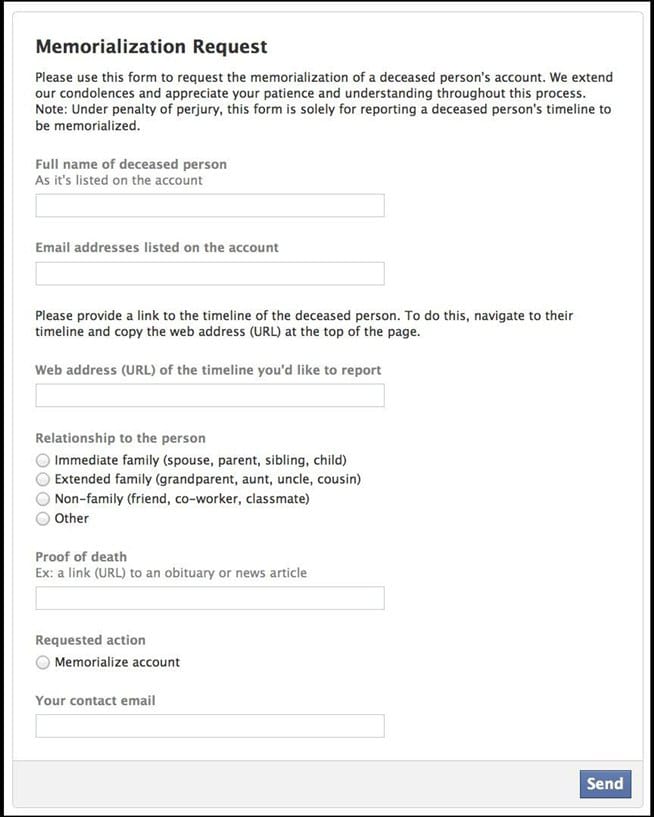
In a nutshell, all you have to do to get someone’s Facebook shut down quickly is report that person as dead. This is how it works exactly…First, you go here on Facebook and fill out the Memorialization Request. As you see, everything on that form is easy to fill out. The only thing that might be tricky is the link to the obituary, and here’s the crazy part about that…

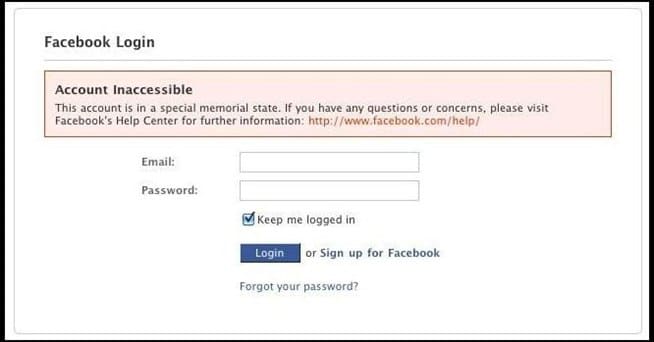
Katie at Buzzfeed went through this process to investigate it, and when it came to linking to the obituary, she linked to someone who lived in a different state, who was much older, who had a different spelling for the name, and who was very obviously a different person – but it still worked. Once you submit the form, you just wait a day or so, and then if you receive a notice from Facebook comforting you about the death of your friend, you know they bought into it. The next time your friend tries to log into his or her account, they will find out that the account is inaccessible. They will receive the message I’ve put in the image below.

Now for what your friend will have to do after you’ve had his or her Facebook shut down – In order to reinstate an account after this happens, they will have two options. If they find this article, they will be able to click here and go to the My Personal Account Is In A Special Memorialized State page and fill out that form. The account will most likely be reinstated relatively soon. If they don’t find this article, they will have to go to the Facebook help page and waste a bunch of time researching what to do about it. That is harsh. You might want to think twice before you have someone’s Facebook shut down.

This has to be one of the most diabolical pranks anyone could ever pull on someone. I don’t think I would ever want to get someone’s Facebook shut down. It’s just too nasty for my taste. However, far be it for me to judge you if you want to do it. Just remember, with great power comes great responsibility.

This is the msg your friend will get after you’ve axed the account.
get-someones-facebook-shut-down

This is the Facebook Memorialization Request Form.
get-someones-facebook-shut-down

Via: [Buzzfeed] [WonderHowTo]


You Might Also Like...
Bit Rebels
How Techspeak Can Hurt Your English Grammar Skills [Infographic]
SHARES
220
Upcycled Vintage Shoes Become Retro Walkie-Talkies That Really Work
SHARES
113
Telltale Signs Someone Is Lying [Infographic]
SHARES
319
Digital Footprints Broken Down By Generation [Infographic]
SHARES
219
Tongue Controlled Mp3 Player Now Available
SHARES
137
 
 
Author Avatar Image Representation

Author: Diana Adams


As the editor and global advertising director for Bit Rebels, Diana spends her days fine-tuning the content for Bit Rebels and working with established companies, startups, app developers and Internet entrepreneurs who want to be associated with the Bit Rebels brand. Diana started with Bit Rebels in July of 2009, three weeks after the site launched. She brought fifteen years of Information Technology experience and a love of everything considered geek with her, and she enjoys the journey each day as the site continues to reach more people and progress at a very fast pace. You can usually find Diana working in the Bit Rebels office located in Atlanta or sitting in the corner of a downtown Starbucks somewhere with her MacBook, iPad, iPhone and a Grande Caramel Macchiato. You can reach Diana at diana@bitrebels.com.

5 Comments

Gitana the Creative Diva

January 9th, 2013

Thanks for this information. Truth is I have been wanting to have my friend’s account shut down (inasmuch as he’s been dead for over two years) but I didn’t know how to go about it. Now, in a sense, I feel he can truly be laid to rest. Thanks a lot.

Diana Adams

January 9th, 2013

My pleasure. :)

shortyy

March 14th, 2013

will i have any legal problems afterwards?

Alex Brar

April 20th, 2013

Your smile is deadly in the context of this great post Diana. Wish I knew you. Ha ha

LOL

April 26th, 2013

will it still work for now?

Leave A Comment