
Subscribe

A Browser-Based Dashboard for Twitter

SOCIAL MEDIA | 2 Years Ago By Misty Belardo
Pin It
Previous Article
Check Out More Of Our Geekery
Next Article

When we all started with Twitter the only client we used was the Twitter interface on the web, but now there are so many that one can use to make their Tweeting a lot more enjoyable.

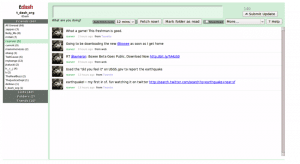
You got TweetDeck, Seesmic, Twurl and a lot more.  Now there is TDash. The developers of TDash designed it to look similar to that of the  Google Reader interface.

The key features of such an interface are:

  • the ability to mark tweets as read, and thus to narrow down the user’s attention to tweets that are as yet unread.
  • sort incoming tweets into nice folders automatically
  • Inline expansion of conversations!
  • Support for Twitter lists
  • Automatic URL shortening via Bit.ly
  • Ability to upload images.

Plus it has Keyboard shortcuts to make it fun and easy to use and is safe because it allows you to sign in using the OAuth.  No need to give out your password.  It is great too that you will not be required to install any software it is web based.

So if you are looking for a new tool to use, try it out and let us know what you think.
Main Image Source
TDash

Get Instant Leads And Recognition - Advertise On Bit Rebels
Author Avatar Image Representation

Author: Misty Belardo

Misty is a Digital Sr. Project Manager at Barefoot Proximity in Cincinnati OH. Her true love is design and self-expression. She believes in encouraging others to bring out their creativity to the surface and in whatever medium they feel comfortable with. A designer at heart that loves hand drawn design. She enjoys sketching, painting and doodling. Creating avatars and hand drawn icons and logos are her favorite. Gifted with a very active imagination and uses that to blog about her interactive experiences. Coffee and music lover. Loves social media, co host of PodJamTV with Marty McPadden. Connect with her on Twitter @mistygirlph and FaceBook : Mistygirlph


Comments

Related Posts

Check out some other geeky articles that you might like.