
Subscribe

How to Create a Bubble Tweet | Video on Your Twitter Page

02/07/2010 | By Diana Adams
1 Star2 Stars3 Stars4 Stars5 Stars (No Ratings Yet)
Loading ... Loading ...

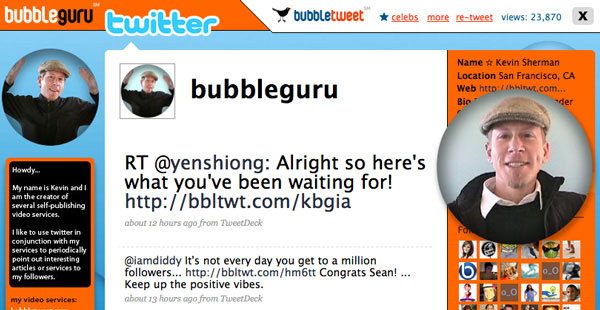
Bubble Tweets are so much fun. They offer a way for you to connect with your Twitter friends in a more personal way since they allow you to talk to your followers instead of just using text. Before Bubble Tweets came along, the only way to show your followers a video was to upload it to YouTube and then tweet the link, but with Bubble Tweet, you will have a video that looks like it is right on your own Twitter page.

If you are unfamiliar with what a Bubble Tweet is, click here to see a quick illustration: http://www.bubbletweet.com/channel/bkmacdaddy Bubble Tweet is simply a URL redirect that sends you to a Twitter page and then displays a bubble which plays a video.

One of the best parts of Bubble Tweet, aside from being free, is that you do not have to register or enter your Twitter password into the site. You just enter your username, it will automatically recognize your webcam, you record up to 30 seconds, and then you will be given a bubble tweet URL to tweet! The bubble floats on top of your Twitter profile page. After your followers have viewed the bubble, it pops and then redirects them to your actual Twitter page. The site allows you to create up to three Bubble Tweets per day.

The applications for this app are endless. According to http://www.secretsofthejobhunt.com, you could even use this service for talking to potential employers which would give you an edge and help you find a new career. This whole process is very simple, very fun and very free. If you would like to follow Bubble Tweet’s creator on Twitter, you can go to @BubbleGuru. To create your own Bubble Tweet, just visit http://www.bubbletweet.com.

This video explains the process very easily, you can set this up in five minutes!
Thank you for sharing your beautiful bubble picture! http://www.flickr.com/photos/lindenbaum/386124762

More Articles By Diana Adams

Author: Diana Adams

By day, Diana is the CEO/owner of Adams Consulting Group, Inc, a technology services and business solutions consultancy firm serving the specific needs of its clients in advertising and public relations. By night, she lives and breathes by writing. After publishing a small cookbook last year, she is now working on her new masterpiece, scheduled for publishing next year. “I could write all night long and not get tired of it. I think that is when you know you’ve tapped into a true passion. Whatever that thing may be, if you could do it all day or night long, lose track of time, ‘wake up’ ten hours later, and still thirst for more, that is a passion, and I feel like I’ve found that in my writing.” Diana also spends many hours each week assisting the homeless men and women in Atlanta. You can find her on Twitter at @adamsconsulting.


4 Comments

Ghd Hair Straighteners

February 7th, 2010

There are different types of straightening iron hair stylers available out there in the market for sale. Those available in the GHD range are unquestionably the best hair straighteners. They have emerged as the staple of the beauty market because of the tremendous features and amazing results that they have to offer. The best thing about them is that they are not only easy to use, but they are also incredibly reliable

[Reply]

Krystyn

February 9th, 2010

I’m going to Bubble Tweet you, D. @Nongling showed me hers awhile back and I always meant to do one.

She rocks in the treetop all night long, huffin and a puffin gonna bubble tweet this song…

:O

[Reply]

[...] 2 Tweets Twimemachine – Easily browse through your old tweets. 2 Tweets How to Create a Bubble Tweet | Video on Your… | Bit Rebels Bubble Tweets are so much fun. They offer a way for you to connect with your Twitter friends in [...]

Joyce Cherrier

February 10th, 2010

Thanks Diana for another great source of info.Whenever I need to find out how to do something I come here first!

[Reply]

Leave a Reply

Anti-Spam Protection by WP-SpamFree

Related Posts

Check out some more great tutorials and articles that you might like.